Tangiband - Teaching Children to Compose before They can Read Music
Role
Design Lead, Product & AI Interaction
Timeline
6 months (Jan–Jun 2025)
Team
10 person product and design team
Responsabilities
Product strategy • Concept direction
AI interaction model • Timbre system
Difficulty architecture • Creation flow
UI design • Design system direction
Recognition
Red Dot Award
Brands & Communication Design 2025
TangiBand is a set of wooden blocks paired with a tablet app. A child builds a shape with their hands, gives it a sound, and moves it through space to make music.
Children learn music backwards. We hand them notation before expression, theory before play, and correctness before curiosity — then wonder why most of them quit before making anything they'd want to keep.

Problem Statement
Children quit music early, and the reason is well documented: a real instrument sounds bad for months. A child's ear develops faster than their hands, so they hear their own mistakes long before they can fix them. Discouragement arrives before competence does.
I reframed the challenge from "how do we teach music better" to:
How do we get a child to their first finished piece of music before they know any theory?


Why This is Hard, and The Opportunities
Three types of product already exist, and each fails differently.
Real instruments demand months of practice before anything sounds good.
Screen-only apps turn music into tapping a grid, no body, no gesture.
AI music generators make the music for you, so the child learns nothing except that a machine does this better.
The gap: a physical object that sounds good immediately, a digital layer that adds expression instead of replacing it, and AI that helps a child start without taking over.
The opportunity: combine physical play + digital expression + AI support.


Real instruments: high creative control, high skill barrier
Music apps: low barrier, little physical interaction
Generative AI: immediate results, low child authorship
Competitive Analysis
I explored references across physical sound control, collaborative music play, and generative audio. Each raised a question for TangiBand: how could children hear the effect of their movements, contribute to a shared piece, and make their own choices about sound?


Abacusynth
the wooden rod synthesizer.
Physical manipulation makes sound design understandable, but it assumes an adult who already knows what timbre is.
Google Sound Blocks
grid based collaborative music play.
Parallel play is powerful. A 2D grid maps poorly to how children handle objects.
ElevenLabs Text-to-Sound
natural-language sound generation.
Generative audio erases the skill barrier completely, and erases authorship with it.
Design Principles
Three rules that settled the disagreements.


Make before read
The child creates something before learning what it's called.
The hand leads
Every core action starts as a physical gesture, not a tap.
Nothing can sound wrong
Every combination produces something valid.
The Bouba/Kiki Effect
The Bouba/Kiki effect was a core research foundation for TangiBand. It describes people's tendency to associate the sound "bouba" with rounded shapes and "kiki" with sharp, angular ones. This connection inspired us to use physical whapes as an entry point into music creation.
We applied this idea to our blocks and sound choices: rounded forms suggested soft, smooth tones, while spiky forms suggested sharper, buzzier sounds. Children build a shape, listen to AI_generated sound options, and choose the one that feels right to them. These associations guide exploration while leaving room for individual interpretation. Our goal was to help children discover and create sounds through what they could see, touch, and hear, before learning musical notation.

The block shapes are waveforms translated into 3D. A child choosing a spiky star over a soft sphere is reading a waveform without knowing the word.
The problem: what does a sound look like?
TangiBand asks a child to pick a shape and a color, then gives them a sound. The whole product rests on one question: which sounds go with which shapes?
Designing the AI interaction
With shapes established as visual cues, the next question was how children would choose a sound for what they had built. I designed a guided interaction that starts with the child's physical choices and ends with a sound they select and save.
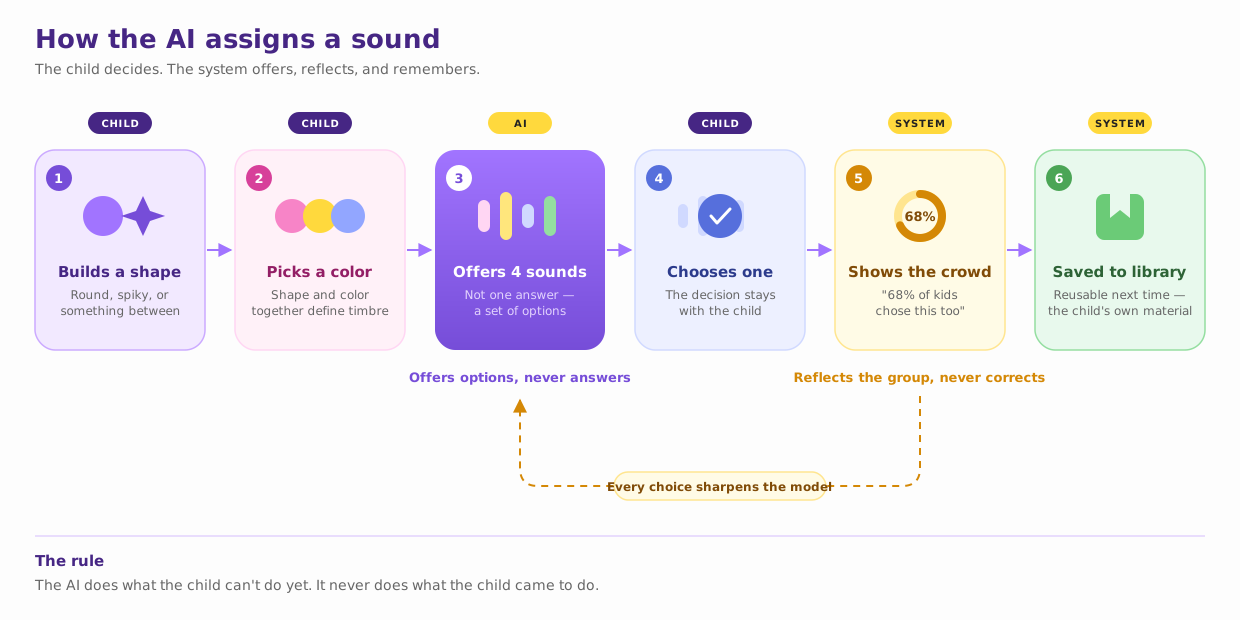
Child builds shape → Child picks color → AI generates 4 candidate sounds → Child selects one → System shows: "68% of kids chose this too" → Sound saved to library
The flow gives children control over the inputs and the final sound selection. We focused on making the options manageable, allowing children to refine a request, and showing different interpretations after they had made their own choice.
Offer a set of possibilites
We presented four sounds and each with a name: Poppy, Lexi, Kiwi, Toby. A child can feel the difference between Poppy and Lexi.
If none fit, the child describes what they want. Before generating anything, the system repeats back what it heard and waits for Confirm or Try Again. Confirming first means a misunderstanding costs one tap instead of a wrong result and a discouraged child.
Make misunderstandings easy to correnct???
If none of the suggestions fit, the child can describe the sound they want using voice input. The interface presents its interpretations and offers Confirm or Try again before requestion a new result. This creates a point where the child can correct a misunderstanding and continue exploring.
Show different interpretations
The concept also includes a comparison showing how other children matched the same shape and color to a sound. We intended this feedback to make different interpretations visible and encourage children to reflect on their own choices.
Support musical experimentation
The musical experience also includes a proposed constraint on note combinations to support musical coherence. Its purpose is to make early experimentation more approachable while children explore sound and movement.
One set of blocks, different sound possibilities
The blocks
We chose plain wooden blocks and assigned color digitally. This allows children to keep a physical shape and try another color, then listen to the resulting sound options. They can also change the shape and repeat the process.
That flexibility was central to the concept. The same set of blocks could support different sound combinations, and children could explore how changing an input changed the available choices.

Production blocks are uniform natural wood, color is assigned digitally.
The tradeoff
A plain block does not display its current digital color or sound assignment. The app therefore has to make that relationship clear during play. The physical object provides the form; the digital layer communicates its current musical role.
The creation flow


Step 1. Alone or together
Step2. Pick a style and a melody to start

Step3. Build and assign
Step3. Build and assign


Step3. Build and assign
Step4. Compose

Step4. Compose
Step4. Compose
Step5. Share
Step4. Compose
Step 1 — Alone or together. Multiple children in the same space. More children, richer music.
Step 2 — Pick a style and a starting melody. The first rung of the ladder.
Step 3 — Build and assign. Camera on. Build the shape, pick a color, hear the options, choose a sound, see how many others agreed. Save it to your library.
Step 4 — Compose. Move the blocks. Hints appear if the child stalls; tips are there if they ask. Blocks interacting produce bonus effects. The background responds to the music.
Step 5 — Finish, share, unlock. Complete the composition, share it, and unlock further opportunities to play.
Turning movement into musical expression
Gestures

Eight gestures, each mapped to a musical property.
Shake · Slide · Collide · Rotate · Separate · Bring together
Shake wobbles the volume. Slide changes how long a note lasts. Rotate adds vibrato. Collide merges two blocks into a new shape with a new sound. Moving a block higher raises the pitch,
These gestures came from what children already do with wooden blocks: shake them, slide them, knock them together, pull them apart, etc.
Composing: Guidance and feedback during play
Progress and collection
Achievements are named after musical ideas rather than points — Beat Beginner, Rhythm Rocker, Harmony Hero — for rhythm, timing, and harmony. Saved sounds build up in a personal library, so the child's material grows with them.
Characters and progress
A pointed cone, a hard-edged cube, a soft round blob, each child picks one as their face in the community.
Learning music takes practice, and it's always a highly disciplined and rigorous process. Characters, achievements, and the sound library are all there to make that easier. The achievements are named after musical ideas: Beat Beginner, Rhythm Rocker, Harmony Hero. Getting better feels like becoming a musician, instead of climbing a scoreboard.
Flows in detail
Composing


One gesture at a time, in context. A single instruction appears at the moment that gesture becomes useful. Six gestures as a tutorial would overwhelm; delivered as you play, it never feels like instruction at all.
The bar counts beats. Eight beats make one complete phrase, and the bar fills as the child plays them. It teaches musical structure, a child learns that a melody has a length by watching one fill up, years before anyone says the word "phrase."
Composing together
Multiple-player shared space
Three children in one space, each bringing their own blocks into a shared piece. Collaboration breaks differently for young children: one dominates, another can't tell what they contributed.
Every block carries its maker's face, so authorship stays visible without a scoreboard.
The mic passes around. A child opens their mic, plays their blocks, everyone hears what they made — then it's the next turn. That turn-taking is what structurally prevents one child from dominating, and it makes listening part of the activity. It's also why the product is a band.
Final Prototype
The prototype brings together sound selection, physical gesture controls, composition guidance, and shared play. It presents the intended journey from building a first shape to creating and sharing a piece of music.
Recognition and next steps
TangiBand received a 2025 Red Dot Award in Brands & Communication Design.
The project established a concept for connecting physical construction with digital music creation. Its central interaction gives children choices about the sounds they use and how they perform with them.
Further testing would need to establish how